AI Workflow Layer
A look at how AI-supported workflow design can make a design system easier to adopt, easier to verify, and more reliable in implementation.
Role
Workflow Design
Context
Claude Code plugin for UDS usage
Timeframe
Current extension of the ecosystem
Project type
AI-supported developer enablement
Scope
Setup, audit, verify, and Figma-to-code orchestration
Key focus
Turning design-system rules into usable workflows
On this page
01
/Overview
Operationalizing UDS knowledge in guided workflows
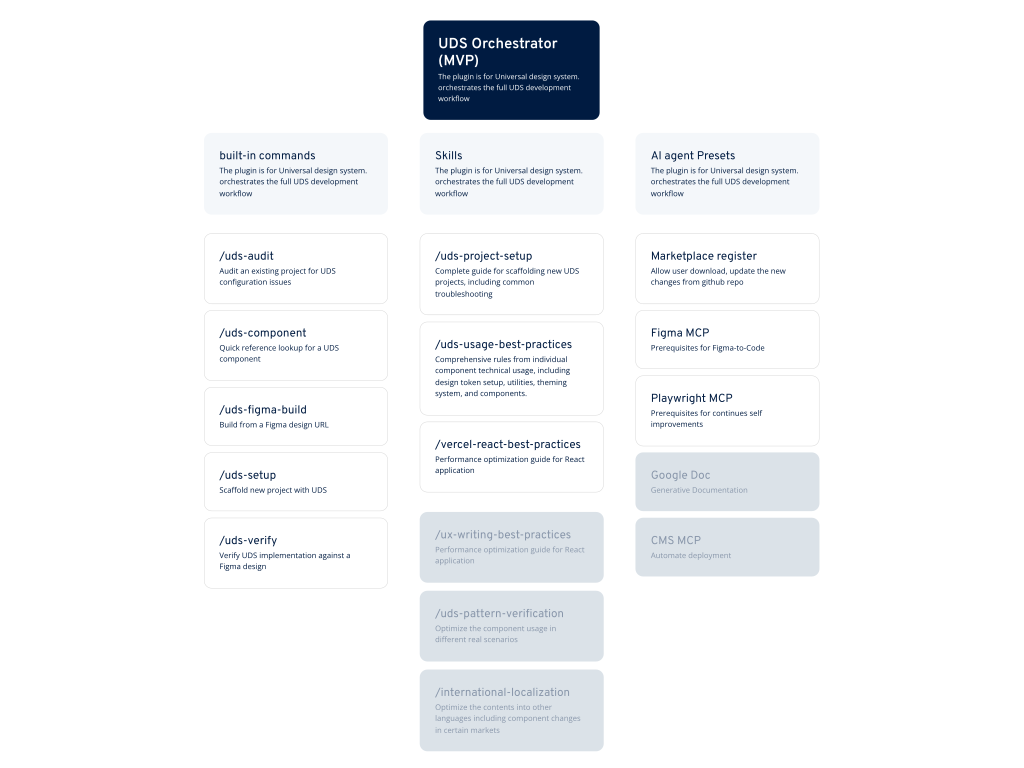
The UDS Orchestrator was built as a Claude Code plugin that turns design-system knowledge into guided workflows. Instead of expecting every team member to remember setup details, token rules, verification checks, and component constraints, the plugin makes those expectations easier to apply step by step.
That makes the Orchestrator different from generic AI experimentation. Its purpose is not to generate noise faster, but to reduce friction around the practical use of UDS.
02
/Challenge
A design system only works when teams use it correctly
Even a strong design system can fail in practice when setup is inconsistent, audits are skipped, or design-to-code workflows rely too much on memory. The challenge was to reduce that dependency on tribal knowledge.
Teams needed more than docs. They needed guided workflows that help them install, verify, and implement the system correctly in real project environments.
03
/Approach
Translate expert rules into concrete commands and checks
The Orchestrator breaks recurring tasks into commands such as setup, audit, verify, and Figma build. Behind those commands sits structured guidance for CSS setup, tokens, ThemeProvider usage, anti-pattern detection, asset handling, and implementation verification.
The strength of this model is that it packages design-system expertise in a way that is easier to apply repeatedly across teams and projects.
04
/Solution
A workflow layer for setup, audit, verify, and Figma-to-code
The plugin orchestrates several high-friction moments in one place: setting up a UDS project, auditing an existing implementation, verifying a built UI against design, and translating Figma structure into UDS-aware implementation logic.
That makes the Orchestrator a workflow layer around the design system itself. UDS defines the rules; the Orchestrator helps teams execute them more reliably.
05
/Outcome
Lower setup friction and stronger implementation quality
The Orchestrator helps reduce setup mistakes, supports more consistent audits, and gives teams a clearer path from Figma decisions to implementation. That is valuable because it lowers the cost of using the system well.
In the broader ecosystem, its role is clear: make UDS easier to apply, easier to verify, and easier to scale beyond a small group of experts.
Outcomes
Workflow type
AI-supported
Core commands
5
Verification layers
2
06
/Outlook
From MVP to a broader workflow layer
The current version is best understood as an MVP that proves the value of guided system workflows. It already shows how setup, audit, verification, and Figma-to-code can be structured around the real rules of UDS instead of relying on memory or scattered documentation.
The next step is to expand that foundation into a broader workflow layer with more reusable commands, clearer team pathways, and stronger coverage across the design-to-development lifecycle. That is where the long-term value sits: not AI for novelty, but AI that steadily reduces operational friction.